Wallpaper Maker
How to set wallpaper1."Wallpaper Maker" MENU, chose "Gallery" > "Wallpaper"2.Chose image, press MENU chose"Set Wallpaper".
How to set Screen size image as wallpaper1."Wallpaper Maker" MENU, choose "Gallery" > "Image"2.Choose image, press MENU choose"Set Wallpaper".3.List of Live Wallpaper, Choose "Walpaer Make" to set Screen size Wallpaper.
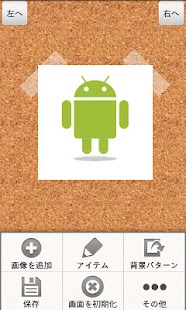
MenuPress, menu button, or Long press screen.
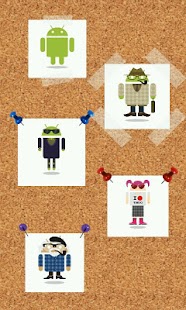
Add Picture Pick the picture, and add to the screen.Item Pick and add items to the screen.Background Pattern Choose bacgkround pattern.Clear Picture Clear all pictures on the screen.Screnn Size Choose the image size, Wallpaper size,Screen Size or LINE Home Size.Shortcut Set shortcut.
(Long Press, Double Tap)Picture Quality Choose save quality of the image.Gallery Check and set wallpapers that you made.
Image Menu Long press pictures you add.
Copy Copy the image.Delete Delete the image.Set Background Set the image as background.
Gallery Wallpaper Press menu, you can Set Wallpaper, Share, and delete the image.Image Press menu, you can Set Wallpaper, Share, or delete the image.LINE Home Press menu, you can Share, or delete the image.
Questions, bug information please e-mail or to [email protected]@mss2011c
About Wallpaper Maker
- Package name (App ID)
- com.mss2011c.wallpapermaker
- Available on
- Google Play
- Price
- Free
- Version
- v1.9.1
- Developer
- Woodside Apps
Looking for the Wallpaper Maker APK?
The safest way to get Wallpaper Maker (com.mss2011c.wallpapermaker) on your Android device is to install it directly from Google Play — you'll always get the latest official version, automatic updates, and no risk of modified or infected APK files from third-party sites.
Social Features
Connect and share with friends and the community.
Food & Dining
Discover recipes and order food from your favorite restaurants.
Smart Home
Control and monitor your home with smart features.
See Wallpaper Maker in Action

Frequently Asked Questions
Is Wallpaper Maker free?
Yes, Wallpaper Maker is free to download and install on Android through Google Play.
How do I install Wallpaper Maker on Android?
Open Google Play on your Android phone or tablet, search for Wallpaper Maker by Woodside Apps or tap the Google Play button on this page, then tap Install. The app downloads and installs automatically.
What is com.mss2011c.wallpapermaker?
com.mss2011c.wallpapermaker is the App ID (package name) of Wallpaper Maker on Google Play. Every Android app has a unique package name, and it is the safest way to verify you are installing the official app.
Is Wallpaper Maker safe to download?
Installing Wallpaper Maker from Google Play is the safest option: you get the official version published by Woodside Apps, verified by Google Play Protect, with automatic updates. Avoid APK files from unofficial third-party sites.
Get Wallpaper Maker Today
Wallpaper Maker for Android — free download on Google Play.
Compatible with Android phones and tablets — available on Google Play.
Ask AI about this app
Get instant answers about features, tips and more from popular AI assistants.